FABRIX 2.0VERIFIED 21 NOVEMBER 2026

Engineering
Demonstration Guide

Ten-minute walkthrough using actual Cloudflare portal screenshots, synthetic engineering inputs and real generated fabrication outputs.

22 / 22Live browser tests passed
33 to 11Weld rows to physical connections
25.04 hExample labour incl. access

The pipe-rack project, IFC mini-frame, Tekla JSON fixtures and deck worksheet are separate synthetic references, not one coordinated real engineering model.

FABRIX | REFERENCE DATA ONLY - NOT FOR SHOP ISSUE01
FABRIX - SOURCE FILE MAPBEFORE STARTING

Input files: what to upload where

Fixture fileScreen / actionExpected observation
01_IFC4_Mini_Frame.ifcModel Intelligence > Import IFC model3 elements, 2 with quantities
02_Tekla_Connections_Revision_A.jsonConnection Library > Register & groups33 weld rows -> 11 physical connections
03_Tekla_Connections_Revision_B.jsonConnection Library > Register & groups9 still matching; changed configuration
04_Fabrication_Master_Table.csvDeck Job Cards > Import master table7,959 accepted weld-master rows
05_Fabrication_Part_List.csvDeck Job Cards > Import part list1,421 parts
06_MTO_CSV_Template.csvModel Intelligence > Browse filesUnfilled format reference only
Critical: This kit is synthetic, with unapproved rates and local verification. Never use its PDF or work package as a shop instruction, customer quotation or evidence of licensed Tekla compatibility.
FABRIX | REFERENCE DATA ONLY - NOT FOR SHOP ISSUE02
FABRIX - ENGINEERING WALKTHROUGH00:00-00:45

Project selection

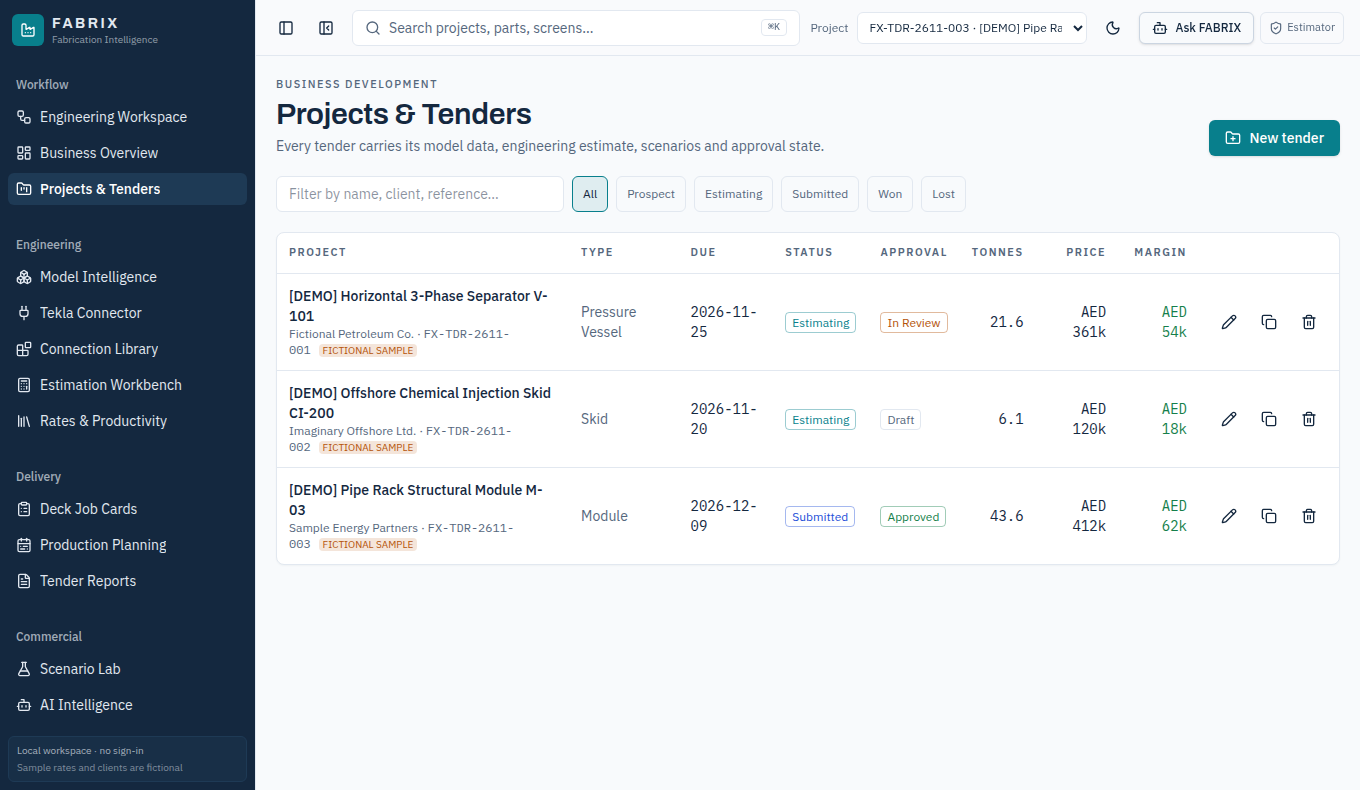
Actual FABRIX screenshot
CLICK / SHOW

Open Projects & Tenders. Select FX-TDR-2611-003, the fictional Pipe Rack Structural Module M-03.

SAY TO THE AUDIENCE

FABRIX complements Tekla; it is not a Tekla replacement. Today we use a fictional pipe-rack project, with independent synthetic reference files for each engineering input path.

EXPECTED RESULT

The selected pipe-rack project is a DEMO record, not a confidential real project.

FABRIX | REFERENCE DATA ONLY - NOT FOR SHOP ISSUE03
FABRIX - ENGINEERING WALKTHROUGH00:45-01:35

Import IFC4 geometry

Actual FABRIX screenshot
CLICK / SHOW

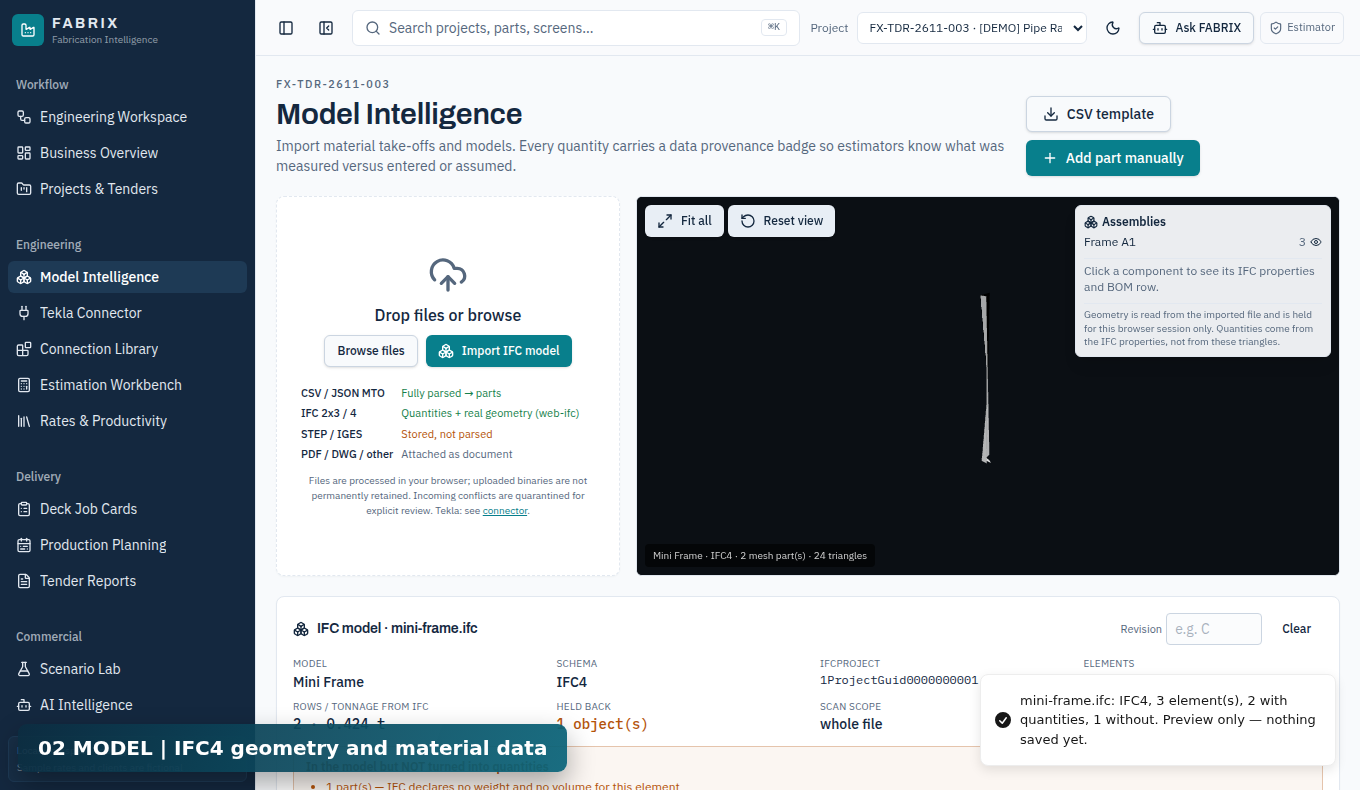
Open Model Intelligence > Import IFC model. Select 01_IFC4_Mini_Frame.ifc and examine the viewer and quantity summary.

SAY TO THE AUDIENCE

The IFC mini-frame contains three model elements, with quantities declared for two. The third object has no weight or volume and is held back rather than assigned a fictional quantity.

EXPECTED RESULT

3 elements; 2 with quantities; 1 held back; about 0.424 tonnes from the IFC.

FABRIX | REFERENCE DATA ONLY - NOT FOR SHOP ISSUE04
FABRIX - ENGINEERING WALKTHROUGH01:35-02:15

Apply reviewed quantities

Actual FABRIX screenshot
CLICK / SHOW

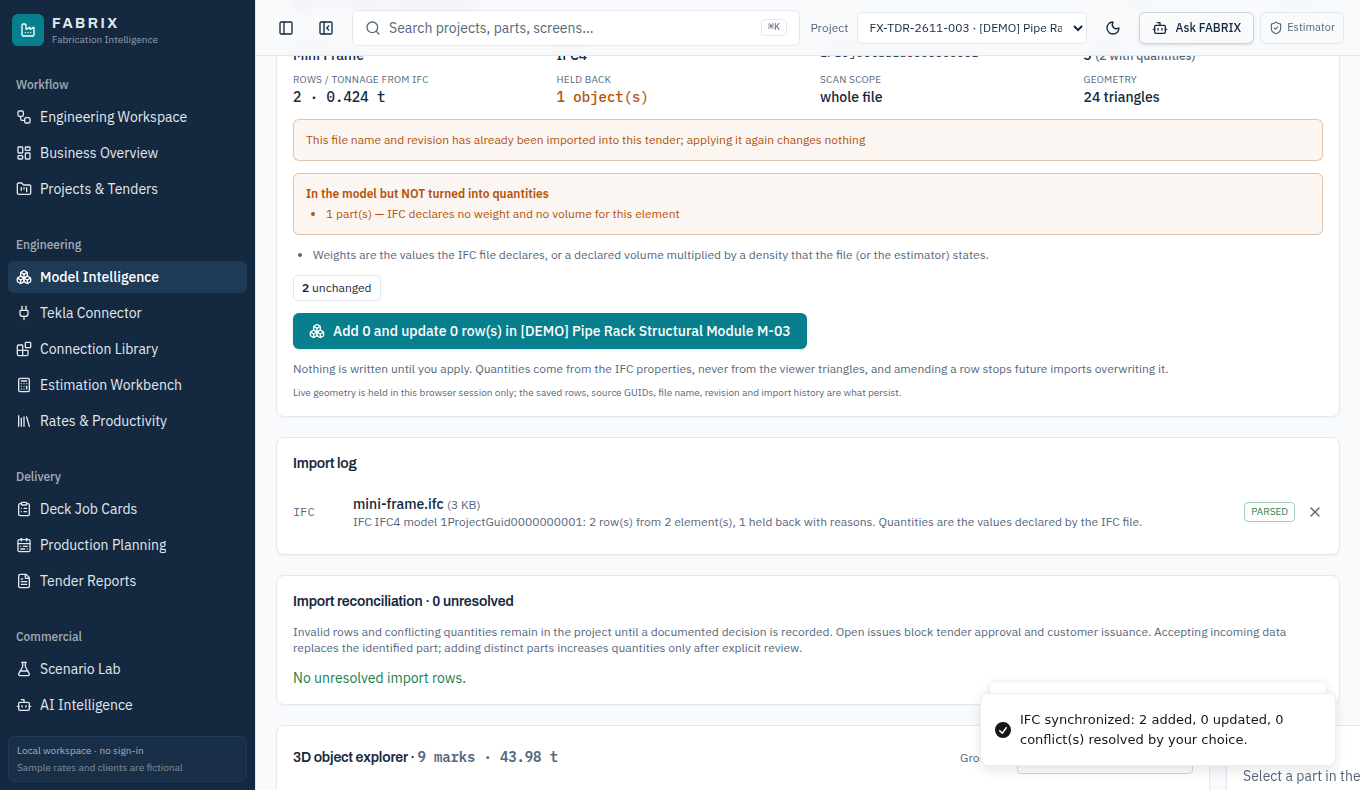
In the IFC import review click Add 2 and update 0 row(s). Confirm the active project has nine parts.

SAY TO THE AUDIENCE

This is the difference between previewing IFC information and accepting two quantity rows into the project. The demonstration part register grows from seven to nine rows.

EXPECTED RESULT

7 existing rows -> 9 after IFC import. IFC mesh geometry was not used as a weight estimate.

FABRIX | REFERENCE DATA ONLY - NOT FOR SHOP ISSUE05
FABRIX - ENGINEERING WALKTHROUGH02:15-03:05

Import Tekla-style connection data

Actual FABRIX screenshot
CLICK / SHOW

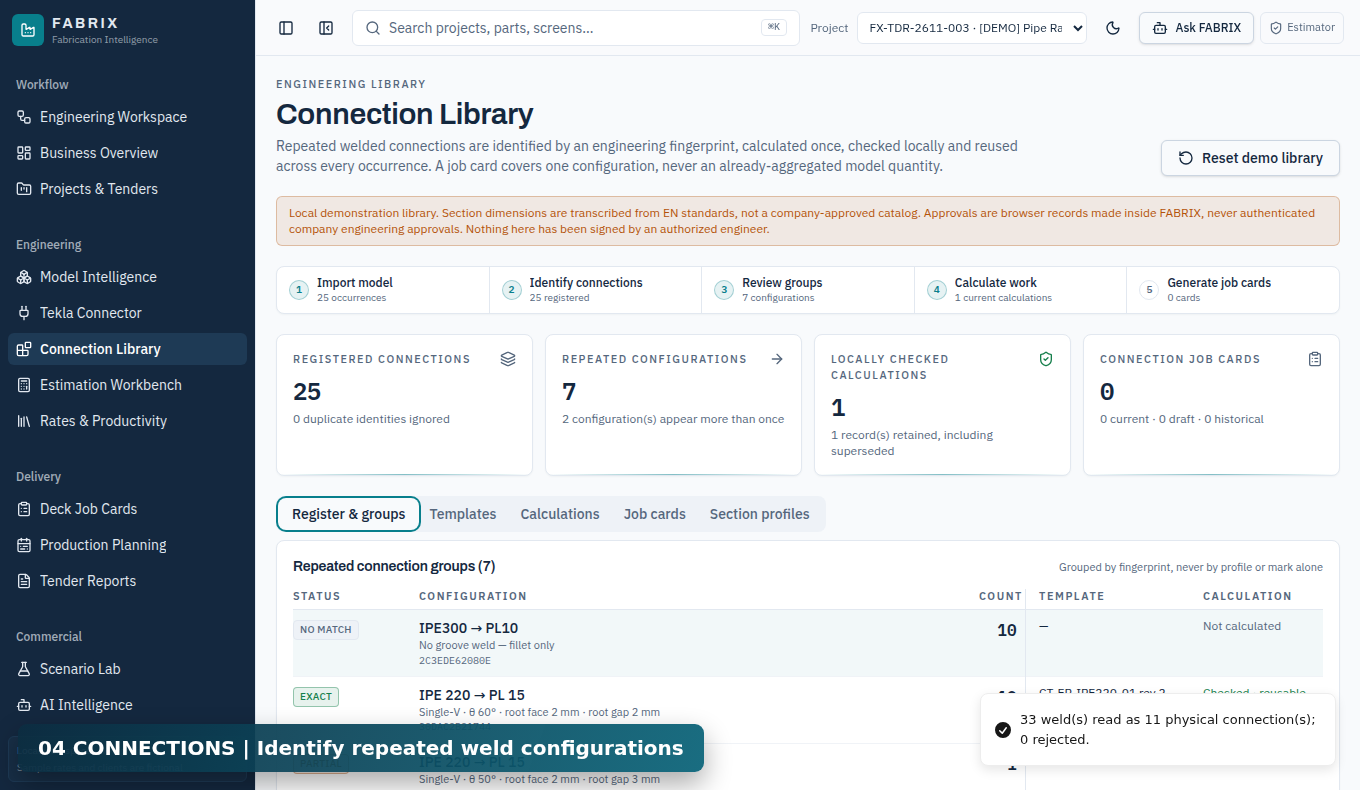
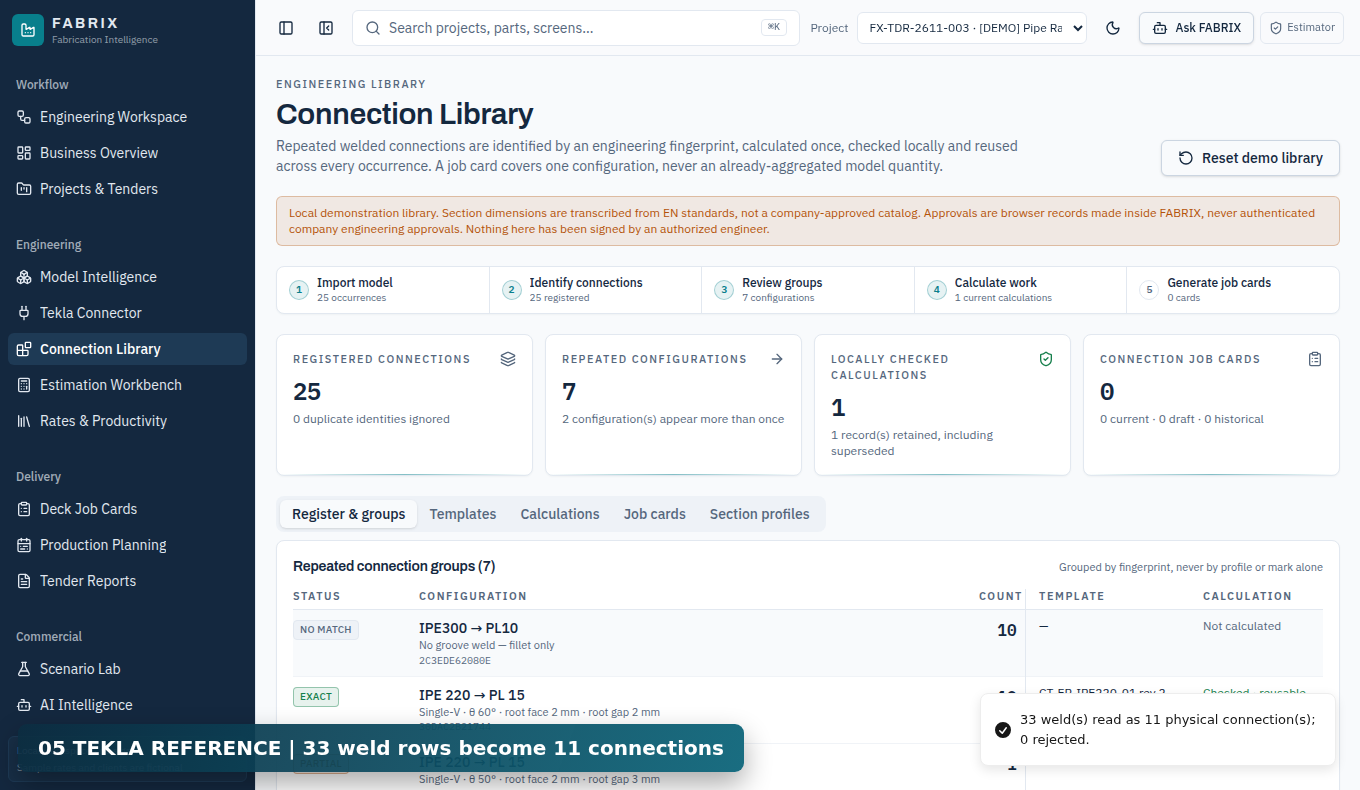
Open Connection Library > Register & groups and import 02_Tekla_Connections_Revision_A.json.

SAY TO THE AUDIENCE

The reference JSON supplies thirty-three weld rows, resolved into eleven distinct physical connections. Multiple weld records can refer to one physical joint.

EXPECTED RESULT

33 weld rows -> 11 physical connections; no live licensed Tekla workstation was used.

FABRIX | REFERENCE DATA ONLY - NOT FOR SHOP ISSUE06
FABRIX - ENGINEERING WALKTHROUGH03:05-03:55

Select ten identical joints

Actual FABRIX screenshot
CLICK / SHOW

Choose the IPE300/PL10 group whose register count is ten. Inspect weld type, process, member and plate information.

SAY TO THE AUDIENCE

Connection fingerprinting allows one calculation to be reused for truly identical fabrication scope. Different preparation or details must produce a separate calculation.

EXPECTED RESULT

One calculation target covers ten repeated physical connections.

FABRIX | REFERENCE DATA ONLY - NOT FOR SHOP ISSUE07
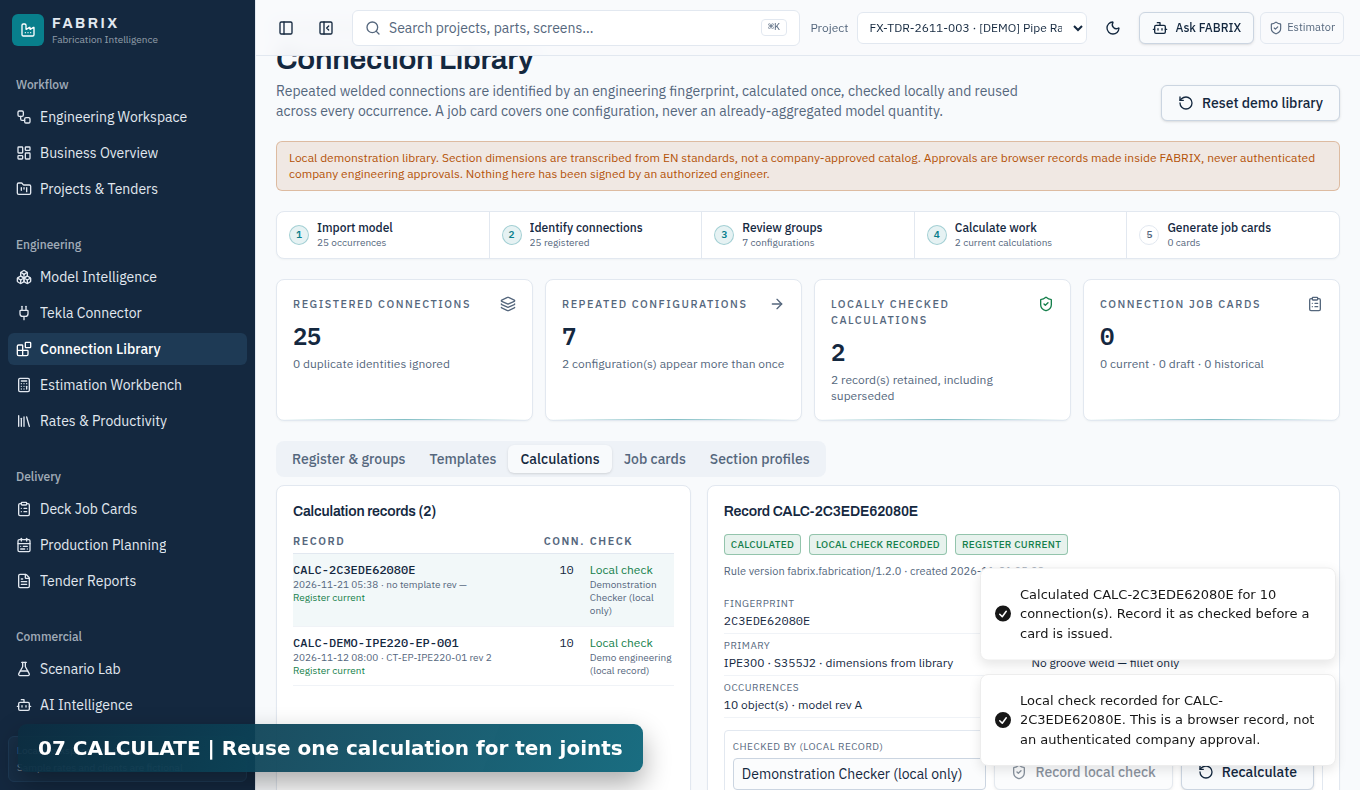
FABRIX - ENGINEERING WALKTHROUGH03:55-04:50

Calculate and record a local check

Actual FABRIX screenshot
CLICK / SHOW

Click Calculate / reuse, enter Demonstration Checker and choose Record local check.

SAY TO THE AUDIENCE

The calculation groups fabrication work into traceable hours and costs. This local check records sample verification and is not an authenticated company engineering approval.

EXPECTED RESULT

Baseline 16.04 fabrication labour hours, 4.14 machine hours separately, AED 991 fictional cost.

FABRIX | REFERENCE DATA ONLY - NOT FOR SHOP ISSUE08
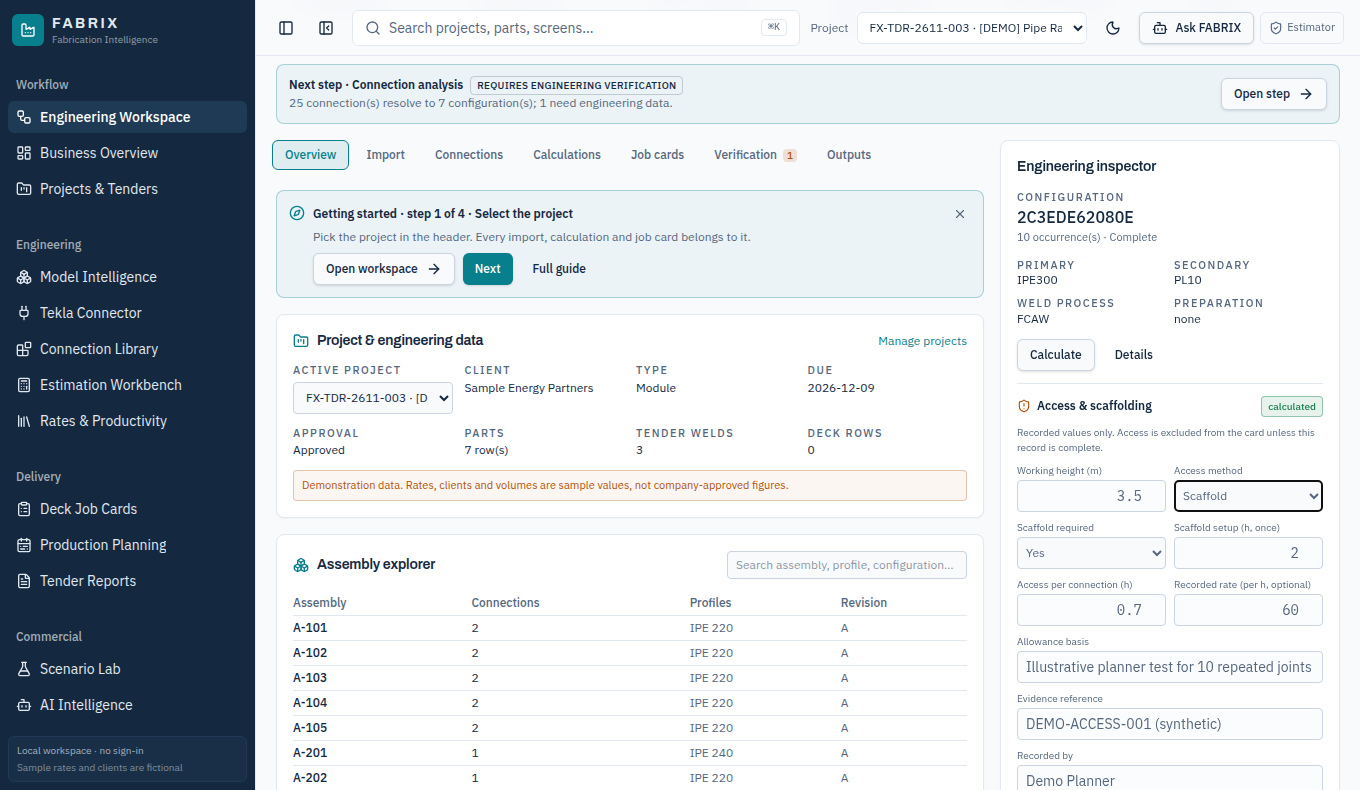
FABRIX - ENGINEERING WALKTHROUGH04:50-05:45

Add recorded scaffold allowance

Actual FABRIX screenshot
CLICK / SHOW

Engineering Workspace > Access & scaffolding. Enter 3.5 m, scaffold, required Yes, setup 2 h, access 0.7 h per joint, rate 60 AED/h, plus synthetic evidence.

SAY TO THE AUDIENCE

Setup is counted only once. Two hours plus zero point seven hours for each of ten connections equals nine added labour hours. The example rate produces five hundred forty dirhams of extra cost.

EXPECTED RESULT

2 + (10 x 0.7) = 9.00 h, and 9 x AED 60 = AED 540.

FABRIX | REFERENCE DATA ONLY - NOT FOR SHOP ISSUE09
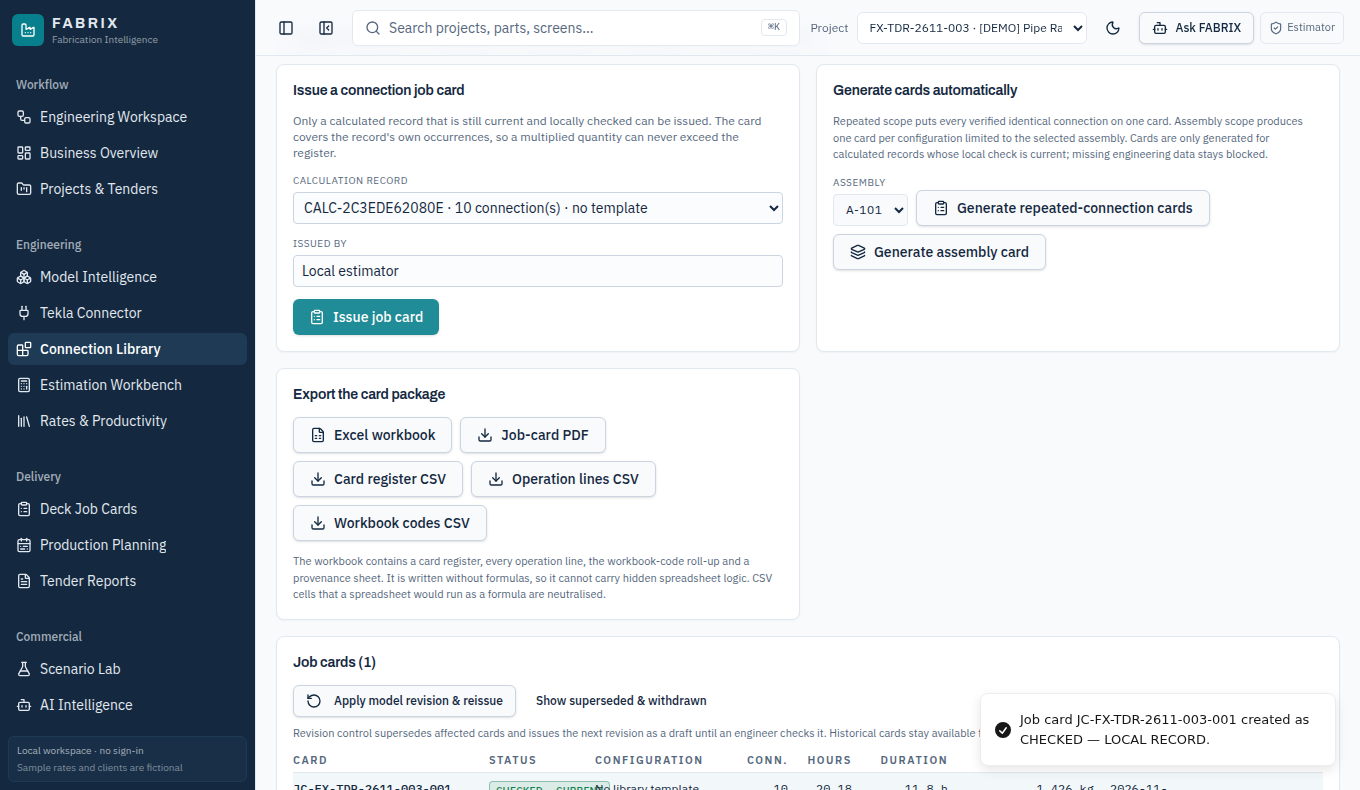
FABRIX - ENGINEERING WALKTHROUGH05:45-06:45

Issue local card and export files

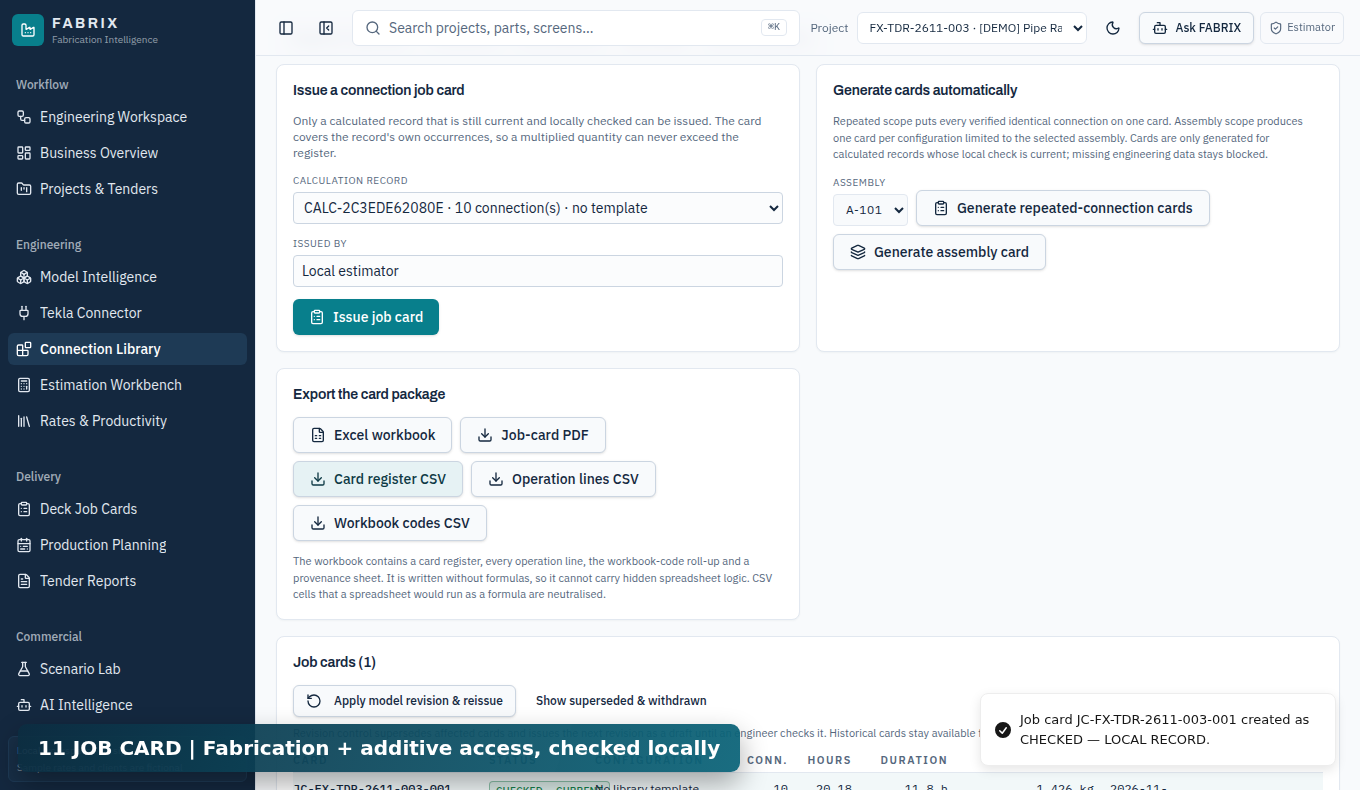
Actual FABRIX screenshot
CLICK / SHOW

Connection Library > Calculations > Issue job card. Confirm in Job cards, then download PDF, Excel and CSV.

SAY TO THE AUDIENCE

The locally checked card preserves the fabrication baseline and prints access as a separate additive line. Fabrication labour sixteen point zero four plus nine access equals twenty-five point zero four hours. Machine hours are separate, not additional labour.

EXPECTED RESULT

Total 25.04 labour hours, 4.14 machine hours; cost AED 991 + 540 = AED 1,531.

FABRIX | REFERENCE DATA ONLY - NOT FOR SHOP ISSUE10
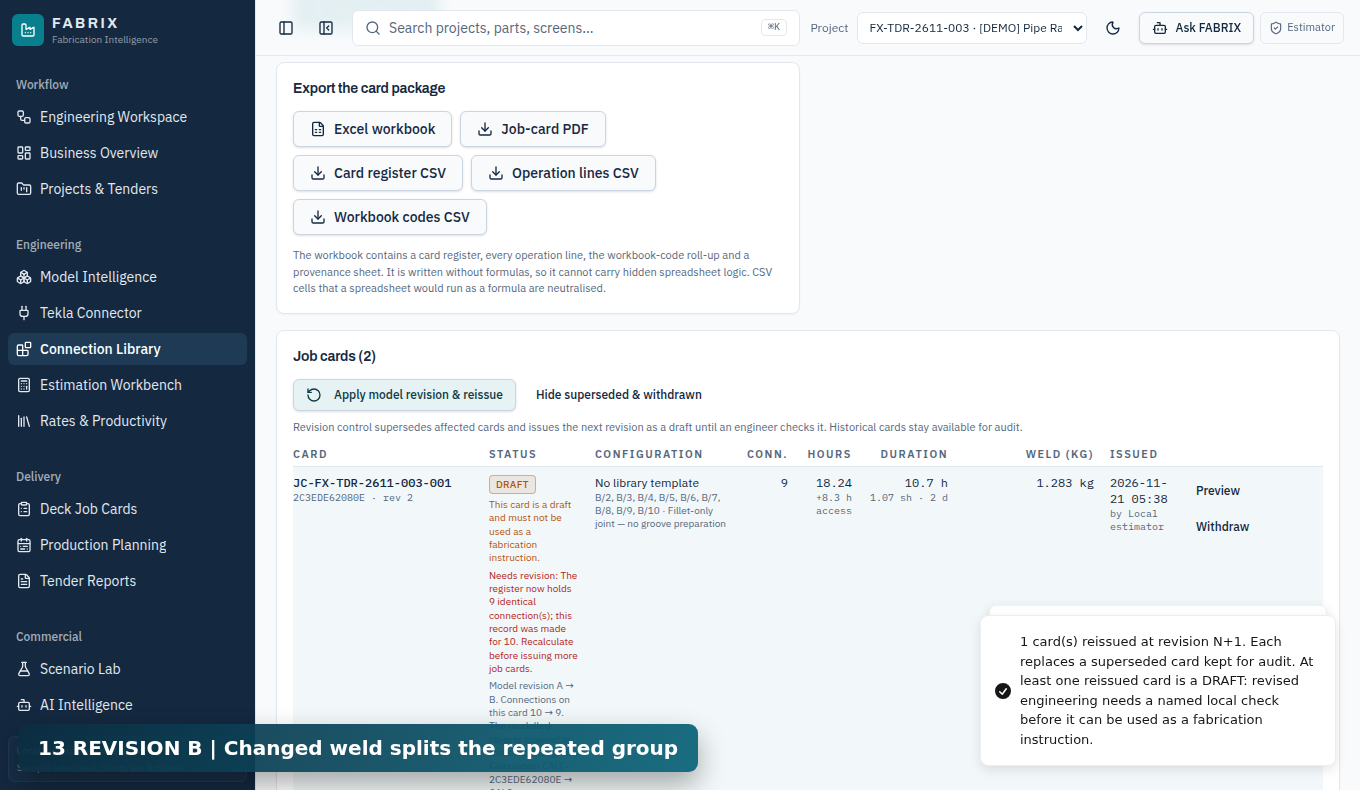
FABRIX - ENGINEERING WALKTHROUGH06:45-07:40

Apply Tekla Revision B

Actual FABRIX screenshot
CLICK / SHOW

Import 03_Tekla_Connections_Revision_B.json, then apply model revision and reissue from Job cards.

SAY TO THE AUDIENCE

One changed joint splits the matching configuration. The original locally checked Rev 1 is superseded, while the new Rev 2 remains a draft until verified.

EXPECTED RESULT

Nine matching in revised group; Rev 1 superseded; Rev 2 draft.

FABRIX | REFERENCE DATA ONLY - NOT FOR SHOP ISSUE11
FABRIX - ENGINEERING WALKTHROUGH07:40-08:35

Deck fabrication data

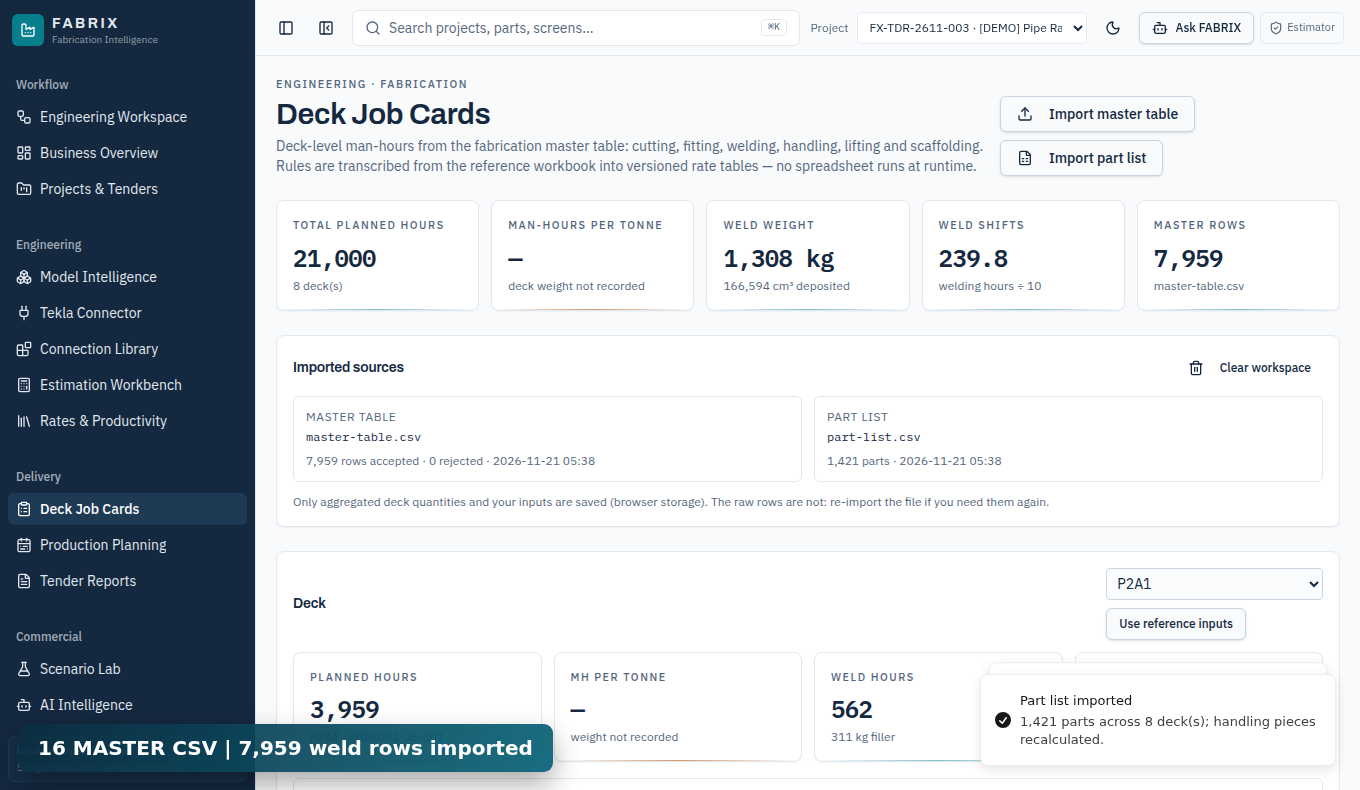
Actual FABRIX screenshot
CLICK / SHOW

Deck Job Cards > Import master table: 04_Fabrication_Master_Table.csv. Then Import part list: 05_Fabrication_Part_List.csv.

SAY TO THE AUDIENCE

This is a separate fabrication-workbook workflow. The actual imported fixture has seven thousand nine hundred fifty-nine master weld rows, one thousand four hundred twenty-one parts and eight decks.

EXPECTED RESULT

7,959 weld rows; 1,421 parts; 8 decks. No automatic IFC-to-weld-master conversion claimed.

FABRIX | REFERENCE DATA ONLY - NOT FOR SHOP ISSUE12
FABRIX - ENGINEERING WALKTHROUGH08:35-09:20

Export deck work packages

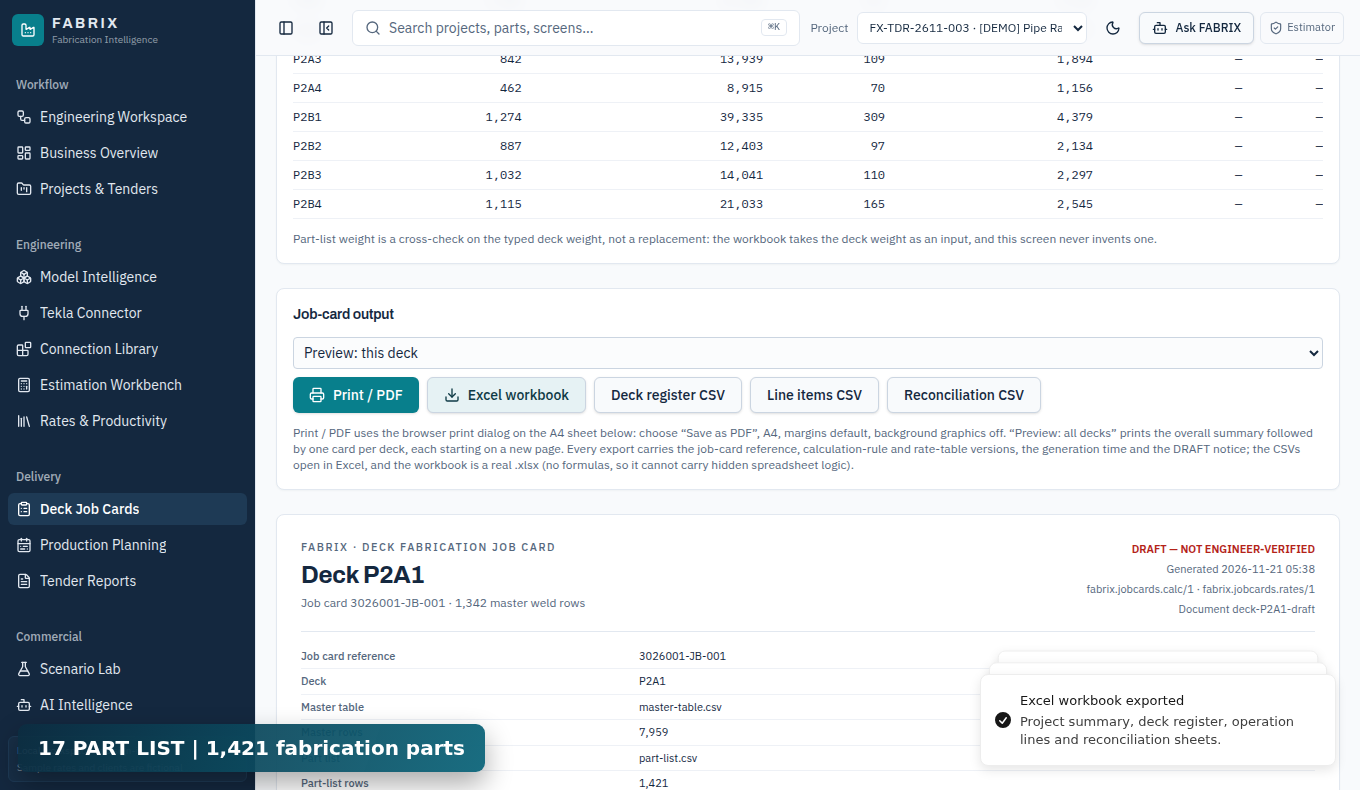
Actual FABRIX screenshot
CLICK / SHOW

Use the Deck Job Cards Excel workbook button, open the downloaded workbook and inspect one deck.

SAY TO THE AUDIENCE

The sample calculates twenty-one thousand planned hours across eight decks. Some weights and lifting counts are missing, and a simple triangular groove-weld approximation remains flagged for engineering checking.

EXPECTED RESULT

21,000 planned hours; missing deck weight prevents meaningful man-hours per tonne.

FABRIX | REFERENCE DATA ONLY - NOT FOR SHOP ISSUE13
FABRIX - ENGINEERING WALKTHROUGH09:20-10:00

Close and answer questions

Actual FABRIX screenshot
CLICK / SHOW

Show the real downloaded PDF, Excel and CSV; finish with the acceptance limitations.

SAY TO THE AUDIENCE

These are verified synthetic demonstrations of the software workflow, not approved structural calculations. Before company issue, validate against licensed Tekla, released drawings and WPS, engineering time studies and approved commercial rates.

EXPECTED RESULT

Demo workflow passes; formal shop release and actual Tekla verification remain pending.

FABRIX | REFERENCE DATA ONLY - NOT FOR SHOP ISSUE14
FABRIX - DEMO CONTINGENCYIF INTERNET OR IMPORT FAILS

Fallback and the boundaries of evidence

Use the prepared evidence

Option 1 - Play the fallback MP4

The video records the real portal in a private browser with synthetic data. It includes on-screen captions and offline generated narration.

Option 2 - Show exported PDF/Excel

Open outputs/FABRIX-Connection-Card-RevA.pdf and the connection/deck Excel workbooks. Show real downloaded files instead of making unverifiable claims.

Option 3 - Resume from screenshots

Follow the screenshots by chapter. Expected results: 33 -> 11 -> group 10; labour 16.04 + 9 = 25.04 h; rev 1 superseded and rev 2 draft.

Never claim these are finished

Engineering acceptance

No licensed Tekla model, released WPS, independent code-compliance review, or approved company time studies were used.

Cloud sharing

The live UI still displays Local workspace - no sign-in. Browser session state is not an enterprise shared record.

Complete deck quantities

Weight, lifting and scaffold planning inputs are incomplete; 21,000 planned hours are only a reference figure.

FABRIX | REFERENCE DATA ONLY - NOT FOR SHOP ISSUE15